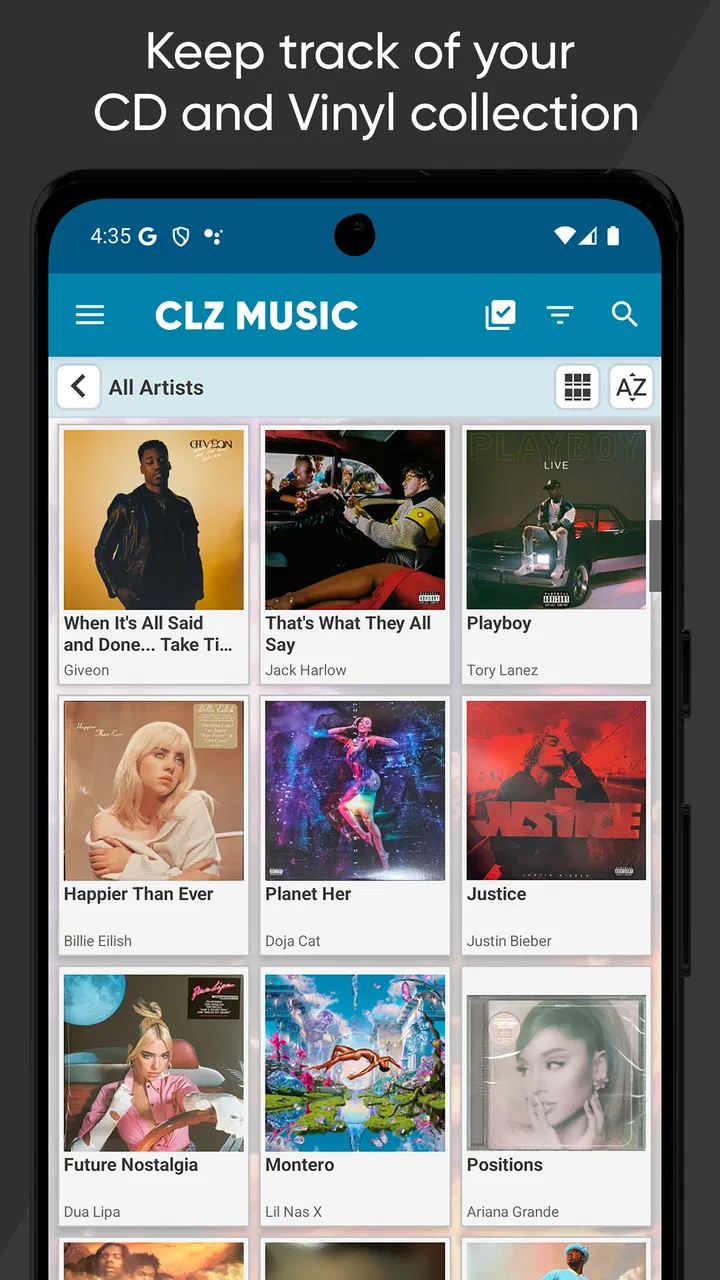
CLZ Music, CD/vinyl collection
- 4.7
- Rating
- 100.00K
- Installs
- Free
- Price

 Analysis by App-foxy
Collecting physical music is satisfying until the collection becomes large enough that memory stops being useful. I have often remembered owning an album but not whether it was a CD, a vinyl pressing, or a duplicate bought years later. CLZ Music is built around solving that specific problem: it lets me catalog music albums by scanning their barcodes instead of typing every title manually. That single capability changes the app from a simple list into a practical reference tool for a shelf, storage box, or record-shopping trip.
CLZ, the developer behind the app, has kept this Music & Audio app focused on physical album collections. It is free to install, rated for Everyone, and works on Android devices running at least version 6.0. The current version is 11.1.3, while the app itself has been available since December 6, 2010. Its average rating is 4.7 from around 3.7 thousand ratings, and it has passed 100 thousand installs. Those figures suggest a mature cataloging tool rather than a brand-new experiment, but the real question is whether barcode scanning fits the way you collect.
Barcode scanning is the reason to use it
The strongest part of CLZ Music is not that it stores album names. A spreadsheet, notes app, or even a carefully organized folder can do that. The useful difference is the starting point: I can point the phone at an album barcode and use that scan to add the release to my collection. For someone cataloging a shelf of CDs or a stack of boxed records, this removes the most tedious part of the job.
You May Also Like

 Pandora - Music & Podcasts
Pandora’s Music Is Easy to Start, but Harder to Recover
Pandora’s strength is its low-effort path from a seed to a station. Its weak spot is how much confidence it asks you to place in connection, setup, and quiet recovery.

 8 Ball Pool
 Is Built on Rivalries, Rematches, and Routine
A close look at the rivalries, rematches, shared routines, and unanswered safety questions that turn a quick pool match into a persistent mobile community.

 Samsung Music
’s Quiet Strength Is Playing What You Already Own
Its reach comes less from spectacle than from dependable access to a personal library. That simplicity is both the app’s strongest retention engine and its ceiling.

 AccuWeather: Weather Radar
AccuWeather Review: A Quick, Clear Forecast for Everyday Decisions
For everyday plans, the best forecast is the one you can understand quickly. AccuWeather makes rain timing, radar, and local conditions easy to act on, with a few trade-offs.

 Hill Climb Racing
Why Hill Climb Racing Still Turns Crashes Into One More Run
A tiny car, a bumpy hill and one more upgrade: Hill Climb Racing keeps resurfacing because its simple chaos makes every near-miss feel personal.

 AliExpress - Shopping App
AliExpress Makes Global Shopping Feel Personal, but Shoppers Bear the Risk
AliExpress turns a global marketplace into a pocket-sized discovery engine. Its reach is useful, its shopping loop compelling, and its trade-offs easy to miss.
More From Our News Desk
View All News


That matters because manual cataloging has a hidden cost. Entering an artist, album title, format, and edition one item at a time encourages me to postpone the work. A postponed collection quickly becomes an unreliable collection. Scanning makes the first pass feel more like sorting than data entry, so I am more likely to finish a batch while the albums are already in front of me.
The capability is especially valuable when I am standing in a secondhand shop. Instead of trying to recall every album at home, I can check my catalog before buying another copy. The benefit is not merely speed; it is confidence. A collection app earns its place when it prevents duplicate purchases and helps me remember what is stored out of sight.
There is an important distinction, though. Barcode scanning is most useful for releases that actually have a readable barcode and a matching catalog entry. It is not a magic solution for every object a music collector owns. Older records, unusual editions, promotional items, handmade releases, and albums with damaged or missing barcodes may still require extra attention. I see scanning as the fast front door to the collection, not a promise that every item will be identified perfectly without review.
What the scan changes in a real collection
When I add albums in a batch, the workflow feels more deliberate than simply taking photographs of the shelves. A photo can show what is present, but it is awkward to search later and easy to overlook when albums are packed away. A catalog built from scans gives me a more useful memory of the collection: I can look for an artist or title without physically opening every box.
This is also where the app becomes more than a shopping aid. I can use the catalog while reorganizing shelves, checking whether a borrowed album has returned, or deciding which duplicates to keep. The scan-based approach creates a record that can be consulted away from the shelf, which is the main reason I would choose it over a generic notes app.
I would still review each result instead of scanning continuously with no checking. Collections often contain editions that look almost identical but differ in format, region, packaging, or release details. A quick confirmation after each scan is a small price to pay for avoiding a catalog that is fast but misleading. The more valuable the collection, the more important that verification step becomes.
How I would set it up without creating extra work
I would begin with one shelf or one storage box rather than attempting the entire collection in a single session. That makes it easier to notice how the catalog handles my particular mix of CDs and vinyl and exposes unusual items before the project becomes too large. It also gives me a clean stopping point if I only have a few minutes.
My practical routine would be to scan an album, check the identified release, and immediately place the physical item back in its intended location. I would keep duplicates together during the first pass instead of deciding their fate while cataloging. Mixing cataloging with decluttering sounds efficient, but it creates two decisions for every album and makes mistakes more likely.
For a large collection, I would work in short batches and use a simple physical marker for items already processed. Without that step, it is easy to scan the same stack twice or miss albums moved to another room. The app can organize the digital record, but the collector still needs a reliable physical workflow.
The app is free to install, which makes trying this process low-risk. It includes in-app purchases ranging from $0.99 to $19.99 per item, so I would check the purchase screen carefully before committing to a longer-term cataloging routine. The store summary also presents a US $20 per year plan, an important cost consideration for anyone comparing this with a spreadsheet that has no subscription.
A realistic weekend use case
Imagine I have several boxes of CDs inherited from a relative and a shelf of vinyl collected over the years. Before CLZ Music, I might know the broad shape of that collection but not its exact contents. On a quiet weekend, I could take one box at a time, scan the albums, and use the resulting catalog when sorting the records into keep, sell, lend, and duplicate groups.
The useful moment would come later, when I am at a used-record store and find an album that looks familiar. Rather than relying on a vague memory, I could check the catalog. If it is already there, I can inspect the physical copy at home before buying another one. If it is not there, I can make a more informed decision instead of wondering whether the missing item is buried in storage.
This scenario also shows the app’s limitation. It helps me know what I own, but it does not remove the need to judge condition, pressing differences, or sentimental value. A catalog can support a buying decision; it cannot replace the collector’s eyes and preferences.
Where the convenience has limits
The biggest trade-off is the difference between identifying an album and documenting it accurately. A barcode can make the first step quick, but collectors may care about details that are not obvious from a scan. If I own several versions of the same album, I would want to slow down and make sure the entry represents the copy on my shelf rather than a similar release.
That extra checking can make a carefully maintained catalog take longer than the store summary suggests. The app is excellent for reducing repetitive typing, but it does not mean that a serious collection becomes completely automatic. I would be disappointed if I expected to scan hundreds of items and never inspect the results.
Another trade-off is specialization. CLZ Music makes sense when the collection itself is the focus. If I only stream music and rarely buy physical albums, a streaming service’s library, purchase history, or a basic notes list may be enough. Installing a dedicated cataloging app for a handful of discs would add maintenance without solving a meaningful problem.
Cost is another point to weigh. The free starting point is helpful, but the in-app purchase range and the listed annual plan mean the long-term value depends on how seriously I use the catalog. For a substantial CD or vinyl collection, paying for a tool that prevents duplicates and saves repeated searching may be reasonable. For a small shelf, a spreadsheet may remain the better bargain, especially if I enjoy controlling every field myself.
Compared with the usual alternatives
A spreadsheet offers flexibility that CLZ Music does not necessarily aim to provide. I can create columns for purchase price, condition, storage location, seller, or personal notes and change the structure whenever I want. That is attractive to collectors who enjoy building a custom database. The downside is that I must type and maintain the records myself, and a spreadsheet usually does not make barcode-based entry the central experience.
A notes app is faster for casual reminders but weaker as a searchable collection. Writing “albums in the blue box” may be enough for a temporary move, yet it becomes frustrating when I need to locate one artist among several rooms of storage. CLZ Music is more useful when the catalog needs to remain a working reference rather than a one-time inventory.
Shopping lists and music streaming libraries solve a different problem. They tell me what I want to hear or buy, not necessarily what physical copy I already own. The barcode-centered workflow is valuable precisely because it connects a real object in my home with a searchable digital record.
For a collector who wants highly customized archival records, a general database may still be preferable. I would choose that route if my main goal were detailed provenance, condition grading, or a complex valuation system. I would choose CLZ Music when the priority is getting a reliable album inventory started quickly and keeping it usable during everyday collecting.
Small habits that make the catalog more reliable
I would scan duplicate-looking albums separately rather than assuming one entry covers them all. Even when two copies share an artist and title, their physical formats or release details may matter to the owner. Treating each copy as a separate cataloging decision prevents a tidy-looking list from hiding gaps.
I would also avoid cataloging during a rushed shopping trip unless I have time to inspect the result. A quick scan can answer whether an album is already represented, but rushed decisions are where an incorrect match is most likely to remain unnoticed. For buying trips, I would use the catalog as a reference first and perform detailed cleanup later.
For mixed collections, I would establish a consistent rule before starting: for example, catalog every physical album I own, including duplicates, or catalog only the copies I intend to keep. Either approach can work, but switching rules halfway through makes search results less trustworthy. The app can hold the records; consistency determines whether those records help.
I would treat the initial scan as an inventory pass and a later session as a quality pass. That two-stage approach is more realistic than demanding perfect entries immediately. It lets me capture the collection while motivation is high, then spend focused time on rare, damaged, or confusing releases.
Who gets the most value from it
CLZ Music is a strong fit for people with enough physical music that they occasionally forget what they own. It is particularly useful for collectors who shop secondhand, inherit albums, move between homes, lend discs to friends, or store records in several places. In those situations, the catalog becomes a practical memory aid rather than a decorative list.
It also suits someone who wants a quicker alternative to typing a collection into a spreadsheet. The barcode workflow lowers the barrier to starting, and the app’s long availability and current version indicate that it is intended for ongoing use rather than a one-week inventory project.
I would be more cautious about recommending it to a collector whose holdings are mostly rare items without standard barcodes. That person may spend nearly as much time correcting or completing entries as they would with a custom database. I would also skip it if I only listen digitally, own very few physical albums, or dislike maintaining any catalog after the initial setup.
The age rating of Everyone makes it broadly approachable, but that does not change the more important question: will I actually consult the collection? A catalog is worthwhile only when it prevents a real annoyance, such as duplicate purchases or forgotten storage boxes. If those problems never occur, the app’s specialized workflow may feel unnecessary.
My verdict after focusing on the core feature
The barcode scanner is the reason I would recommend CLZ Music, and it is also the feature that deserves the most realistic expectations. It turns a slow manual inventory into a manageable process, especially for shelves of recognizable CDs and other releases with usable barcodes. That saves effort at the moment when most collection projects fail: the first large batch of entries.
It is not a replacement for careful checking, and it will not make unusual editions or a tiny collection suddenly need a dedicated database. The in-app purchase model also deserves attention before I invest time in building a long-term catalog. Still, for a serious physical music owner who wants a searchable record without starting from a blank spreadsheet, the balance is convincing.
I would install it before reorganizing a collection, begin with one small batch, and judge the workflow by how accurately it handles my albums. If the scan-and-check routine fits, CLZ Music can become a useful companion for shelves, storage boxes, and record-store visits. Its real strength is not simply listing music; it is making the first step of cataloging easy enough that I am likely to keep going.
FAQs for CLZ Music, CD/vinyl collection
01What is CLZ Music, and what can I use it for?
CLZ Music is a collection-management app designed for people who own CDs, vinyl records, albums, and other physical music formats. After testing its cataloging tools, we found that it is useful for creating a searchable personal library, checking which editions you own, adding cover images and release details, and keeping track of purchases or items you still want. It is especially helpful for large collections that are difficult to organize manually.
02How do I add CDs or vinyl records to my collection?
The app lets you add music in several ways, including scanning a barcode when one is available, searching the online music database, or entering an item manually. Barcode scanning is usually the fastest option for modern releases, while manual entry is more useful for older vinyl, limited editions, regional pressings, or records without readable barcodes. Before downloading, remember that unusual editions may still require you to edit the details yourself.
03Does CLZ Music work offline, and do I need an account or subscription?
CLZ Music can be used to view and manage much of your collection while offline, which is convenient in record stores or places with weak internet access. However, online searches, database updates, cloud synchronization, and some connected features require an internet connection. The app is generally offered as a paid service or subscription-based product, so users should check the current pricing, trial conditions, and included features before committing.
04Can I synchronize my music collection between Android, iPhone, and other devices?
One of the app’s strongest features is cloud synchronization, allowing your catalog to stay updated across supported devices and platforms. This is useful if you switch between Android and iOS, use a phone and tablet, or want to protect your collection from device failure. Setup requires signing in with the appropriate CLZ account, and synchronization works best when you regularly allow the app to complete its cloud updates.
05Is CLZ Music suitable for serious collectors with rare or different pressings?
CLZ Music is suitable for both casual users and dedicated collectors, particularly because entries can include formats, release information, artists, labels, genres, cover art, notes, and personal ownership details. It can help distinguish many editions, but no automated database is perfect. Rare pressings, bootlegs, local releases, and records with unusual catalog numbers may need careful verification and manual corrections to ensure your collection is accurately represented.
Pros
- Scans barcodes quickly and usually identifies common releases accurately.
- Supports CDs
- vinyl records
- cassettes
- and digital albums in one collection.
- Lets you track ownership
- purchase details
- condition
- and personal ratings.
- Powerful filters make it easy to find albums by artist
- genre
- format
- or year.
- Cloud syncing helps keep your collection available across supported devices.
Cons
- Some advanced features require a paid subscription after the trial period.
- Rare editions may need manual editing when multiple database matches appear.
- The interface can feel crowded for users with very large collections.
- Cloud-based features depend on an internet connection for syncing and updates.
- Entering large collections manually can still take considerable time.

CLZ Music, CD/vinyl collection
Gallery